Statehouse Signal
Explore

Your legislative work, beyond the spreadsheet.

A shared workspace for nonprofits, associations and business policy teams. Track bills, keep conversations and next steps together, and report on the work without rebuilding the record.

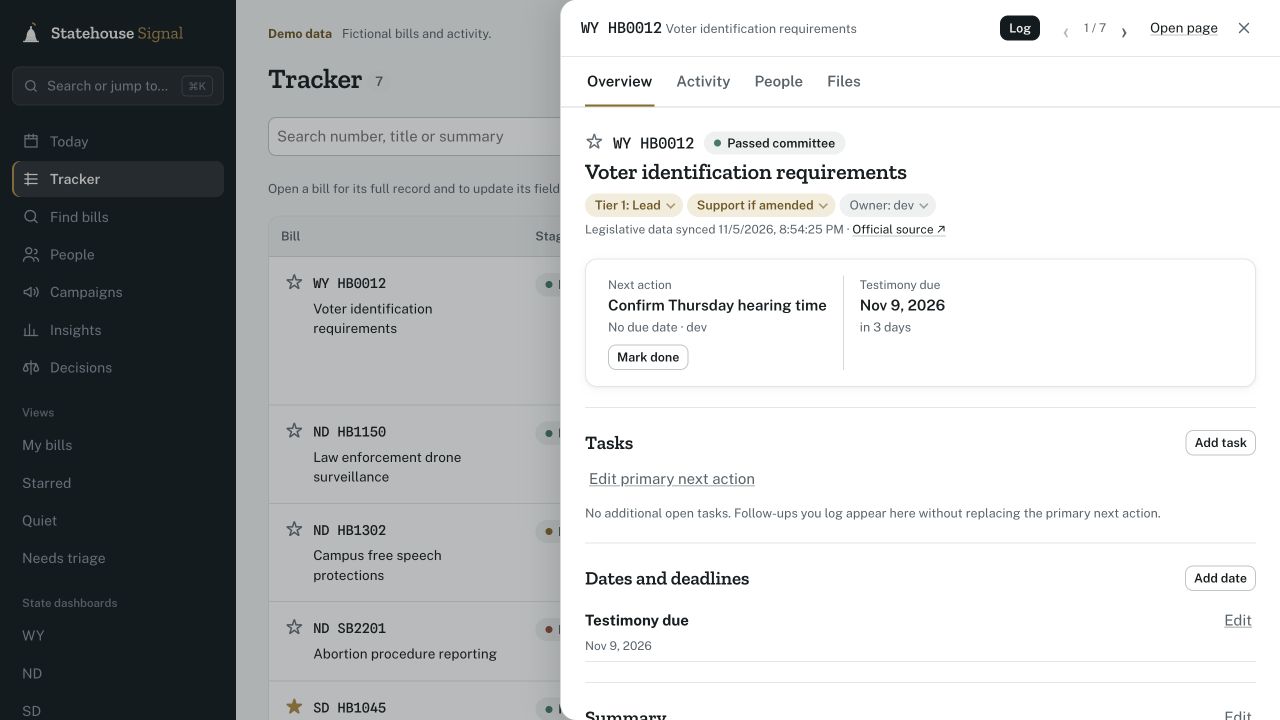
A bill workspace with the team’s priority, position, next action and testimony deadline.
A bill’s next step, in context. Fictional demo data. View full workspace

Keep the work together as the session moves.

  • Your tracker needs another update. Bill status changes, hearing dates move, and someone has to keep the spreadsheet current.
  • The context lives somewhere else. A conversation in an email or a colleague’s notes can be hard to find when you need it.
  • Reporting means piecing it back together. Your team has done the work. Showing what happened should not mean starting over.

Statehouse Signal brings bill updates, your team’s records and session reporting into one workspace.

From the hearing to the handoff.

Keep the bill, the conversation and the next step together.

Know what needs attention

Bills sync from LegiScan every morning. Set your team’s priority, position and owner, with hearings and your own deadlines in the same workspace.

Keyword matches flag new bills. Saved views bring your bills and unreviewed items into focus.
Keep the conversation with the bill

Record a call, meeting or testimony. Link the people involved, note their positions, and keep the reason behind a decision where your team can find it.

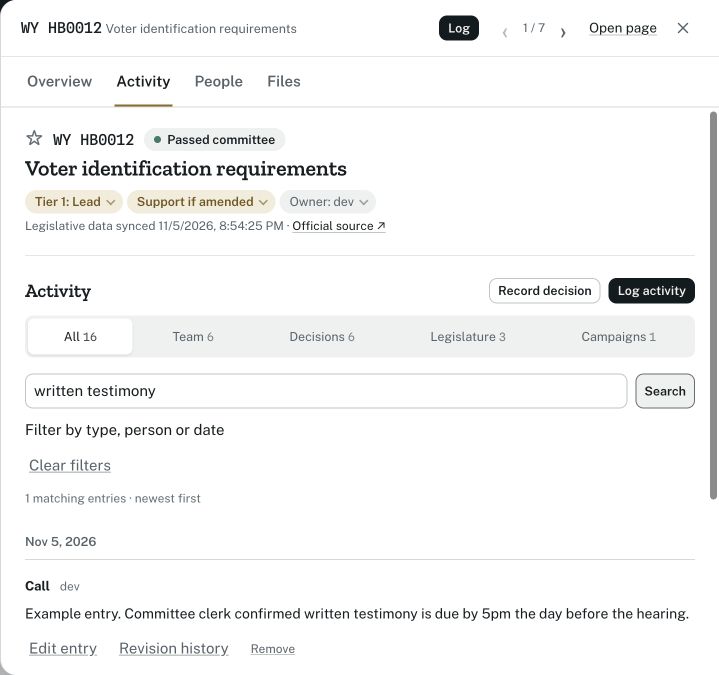
Search the activity history by words, people, type or date.

Make the next step clear

Give the follow-up an owner and due date. A teammate can open the bill, see what happened, and pick up the work.

The activity tab finds a call recording the committee clerk’s written testimony deadline.
A clerk’s call stays with the bill. Fictional demo data. View activity example

Finish with a record you can use

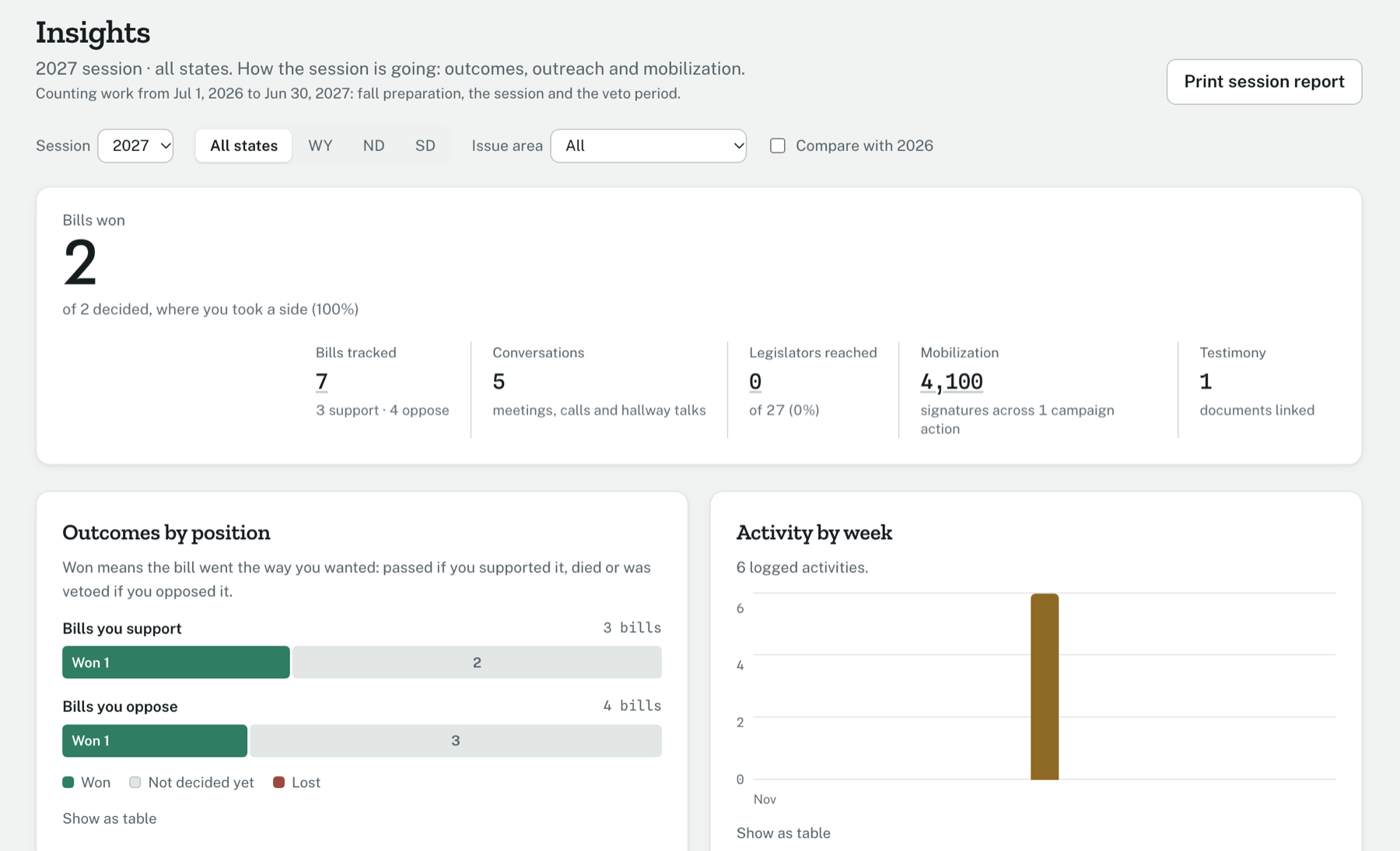
Insights brings together bill outcomes, legislators reached, changes in stance and campaign totals. Print a session report for your board, leadership or funders, or export your tracker as a spreadsheet.

View an example session report

Keep your website’s bill tracker current, too.

If you publish legislative updates, you can also add a bill feed to your existing website. Choose the bills and positions to share, then match the layout, colors and fields to your site. The feed updates as bills move. Your internal notes and meeting records stay out of the feed.

Editorial

Serif type · open layout

Fields: Summary, position and next hearing

2027 legislative priorities

2 bills

  • House Bill 12

    Voter identification requirements

    Adds documents a voter must show at the polls and removes two accepted forms of ID.

    Position
    Oppose
    Next hearing
    Jan 28, 2027, House Corporations, Elections
  • House Bill 150

    Warrants for drone surveillance

    Requires a warrant before law enforcement uses drones for surveillance.

    Position
    Support

Same bills. Different layouts, colors and fields. Fictional demo data.

An optional publishing feature. Use the internal tracker with or without it.

Built for sensitive work

Your team needs a place for candid conversations, working positions and decisions. Clear access rules and a record of sensitive activity help you manage that information.

You decide who joins your workspace.

Give colleagues admin, member or read-only access. Mark an entry private to limit it to its author and your admins. Publishing a website feed is a separate choice.

Separate organizations
Your team’s records are kept separate from other organizations’ records.
Protected notes
Sensitive text uses an organization-specific encryption key managed by the application.
A record of access
Admins can review who viewed, exported or changed sensitive records.

Collect what you need

Record campaign totals without importing supporter contact lists. No advertising pixels or analytics scripts.

Take your tracker with you

Admins can export the tracker as a spreadsheet. Contact us to request deletion of your organization’s data.

Give IT the details

Review how encryption, sign-in and access controls work, where the service runs, and the limits of those protections.

Read the security overview · Technical details for your IT review

Join the 2027 early partner program

Free for the 2027 session

For nonprofit, association and business teams in Wyoming, North Dakota and South Dakota. Use Statehouse Signal at no cost during the 2027 legislative session, get hands-on setup, and help shape the product with feedback from your team’s work.

  • Bill tracking, team records and session reporting
  • Access for your team, including read-only viewers
  • Hands-on setup for your priorities, positions, issue areas and current bills

The optional website feed is included for early partners during the 2027 session. Contact us to discuss pricing for future sessions.

Discuss the early partner program

Why I built this

I spent ten years in the federal government and later ran operations at a small nonprofit. That experience shaped a simple belief: good technology should give small teams more time to do the work they’re here to do.

I built Statehouse Signal to reduce the time spent updating trackers, finding notes and assembling reports. When the information is easier to keep and use, a small team can work more effectively—and put more of its time toward its mission.

Jacob Morrin, founder

Questions

Where does the bill data come from?

From LegiScan, which collects bill text, status, sponsors and calendars from every state legislature. It's licensed under CC BY 4.0, and we sync it every morning.

Which states do you cover?

Wyoming, North Dakota and South Dakota today. If your organization works in another state, contact us to discuss coverage.

Can it replace our spreadsheet?

You can track bills with your own priority tiers, positions, owners, deadlines and issue areas, then export the tracker to a spreadsheet. Bring your current workbook to the demo so we can check which workflows it covers and what still needs setup or development.

Do we need to use the website feed?

No. The internal tracker, team records and reports work on their own. The feed is an optional way to publish selected bills and positions on your existing website. It does not replace your website or publish your internal notes.

Who can see our notes?

Only people in your organization, and private entries only their author and your admins. Sensitive notes use a separate, application-managed encryption key for each organization. The optional website feed publishes only the bills and information your team selects.

Do you store information about our supporters?

Campaign actions record aggregate totals, rather than supporter contact lists. Your team can separately record people you work with and write notes, so only enter the personal information your work needs.

How do people sign in?

With a one-time code sent to their email, or their Google account. You add and remove people from your organization's settings.

Bring a bill you’re working on.

In a 30-minute demo, walk through the tracker, records and reports with bills from your state.

Book a demo

A closer look at Statehouse Signal

Scroll to explore. All examples use fictional data.

The bill workspace

Priorities, positions and the next action, alongside your tracker.

The legislative tracker with a bill drawer open, showing the team’s position, next action and testimony deadline.

The conversation behind the bill

Search activity and keep a record of the people, decisions and follow-up.

Activity search showing a call with a committee clerk and the written testimony deadline.

A record of the session

Bring bill outcomes, engagement and campaign totals into a report.

An example Insights session report with bill outcomes and team activity.